
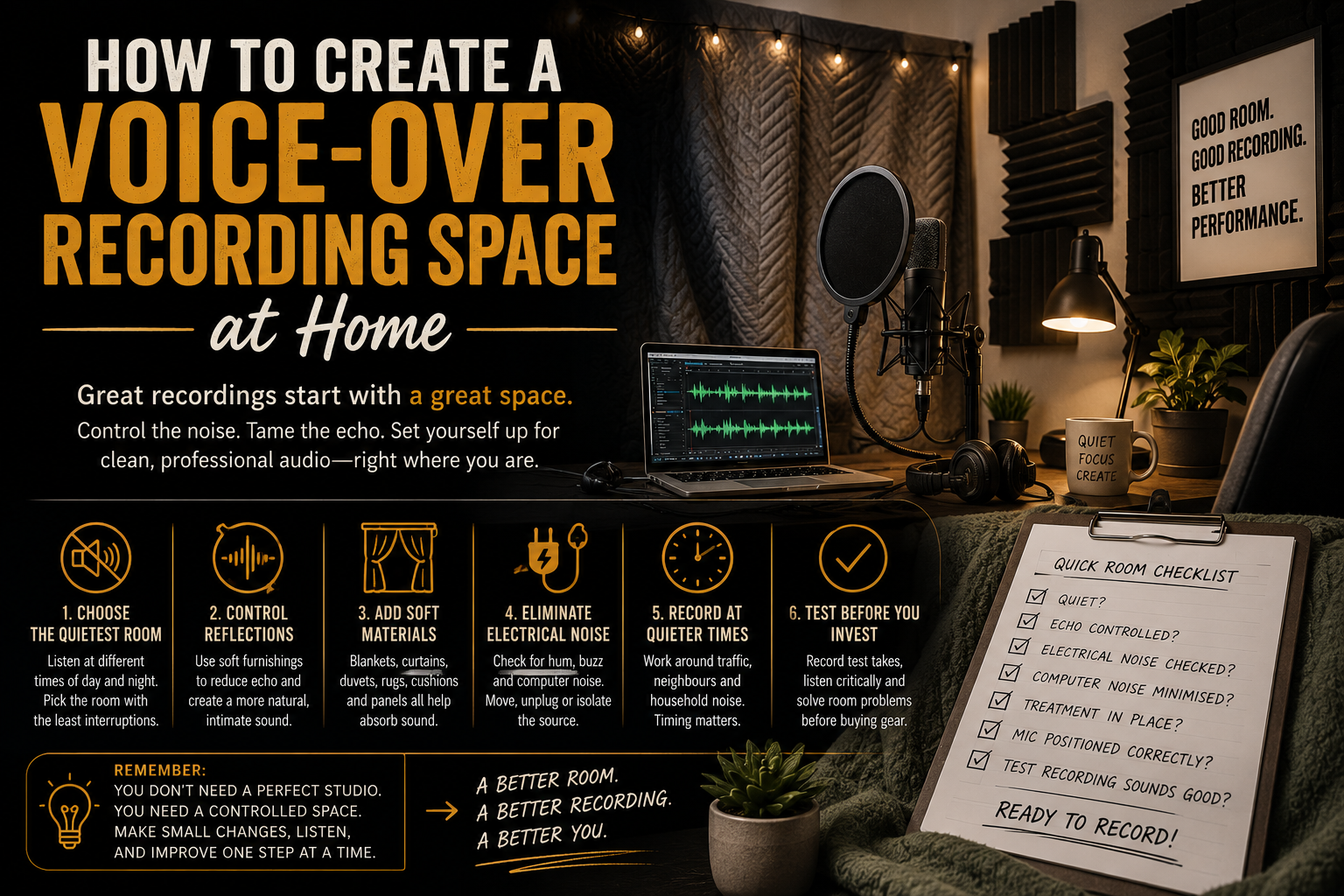
How to Create a Voice-Over Recording Space at Home
How to Create a Voice-Over Recording Space at Home
You do not need a purpose-built studio to begin recording voice-over from home.
You do, however, need a space where your voice can be captured clearly, consistently, and without too much interference from the world beyond the microphone.
For many beginners, the first instinct is to focus entirely on equipment. They compare microphones, interfaces, headphones, and plugins, while the room itself sits quietly in the background causing most of the problems.
The truth is simple:
A modest microphone in a controlled room will usually produce better results than an expensive microphone in a noisy, reflective space.
Creating a usable home recording area is therefore less about building a miniature commercial studio and more about understanding what your microphone can hear.
That includes your voice, the reflections bouncing from nearby walls, the computer fan beneath the desk, the traffic outside, the heating system, the electrical hum, and the neighbour who has chosen this exact moment to begin a passionate career in furniture assembly.
The good news is that many of these problems can be reduced without an enormous budget.
Start With the Quietest Room
Before adding acoustic panels or hanging blankets, choose the best room available.
Walk through your home and listen.
Do not only listen for obvious noises. Pay attention to the quieter, more consistent sounds that your brain may usually ignore:
- Traffic
- Aircraft
- Footsteps
- Plumbing
- Heating systems
- Refrigerators
- Computer fans
- Electrical buzzing
- Neighbours
- Dogs
- Birds
- Wind against windows
- Rain on roofs or conservatories
Your brain is very good at filtering out familiar background noise. A microphone is considerably less forgiving.
A room may feel quiet until you put on headphones and hear the faint mechanical drone that has apparently been living in the wall for years.
Consider the Location of the Room
Rooms farther from roads, shared walls, kitchens, bathrooms, and central household activity are often easier to work with.
A small upstairs bedroom may be quieter than the living room, but it could also sit directly beneath a noisy roof.
A cupboard or walk-in wardrobe may contain useful soft materials, but it could be beside plumbing or an electrical system.
A converted garage may offer isolation from the household while introducing outside traffic, weather, and temperature problems.
There is rarely a perfect room.
The goal is to find the room with the fewest difficult problems.
Choose issues you can realistically control. Echo can often be treated. A busy road directly outside the window is much harder to persuade.
Listen at Different Times of Day
A room that sounds peaceful at midday may become noisy during the evening.
Traffic patterns change. Neighbours return home. Heating systems activate. Children begin moving around. Wildlife apparently holds committee meetings outside the window.
Spend time listening during the hours when you are most likely to record.
You may discover that one room works well in the morning but becomes unusable after school finishes, or that late evening offers the cleanest recording conditions.
This information is valuable before you begin rearranging furniture or attaching treatment to walls.
Understand the Difference Between Echo and Outside Noise
Two separate problems affect home recordings:
- Sound reflecting inside the room
- Sound entering the room from outside
These are often confused, but they require different solutions.
Acoustic Treatment Controls Sound Inside the Room
Acoustic treatment reduces reflections.
When you speak, sound travels away from you and strikes the walls, ceiling, floor, windows, furniture, and desk. It then reflects back toward the microphone.
These reflections can make a recording sound:
- Hollow
- Boxy
- Distant
- Harsh
- Metallic
- Echoey
- Less intimate
Acoustic treatment absorbs or scatters some of that reflected sound before it returns to the microphone.
Examples include:
- Acoustic panels
- Thick curtains
- Rugs
- Duvets
- Moving blankets
- Cushions
- Upholstered furniture
- Bookshelves
- Clothing
- Purpose-built vocal booths
The aim is not necessarily to eliminate every reflection. An entirely dead space can sound unnatural or claustrophobic.
The goal is to reduce distracting reflections enough that the recording sounds controlled and consistent.
Soundproofing Blocks Sound Entering or Leaving
Soundproofing is different.
It involves reducing the amount of sound passing through walls, doors, ceilings, floors, and windows.
Effective soundproofing usually requires:
- Dense construction materials
- Sealed gaps
- Heavy doors
- Improved windows
- Additional wall layers
- Isolation from structural vibration
- Decoupled walls or floors
This can become expensive and disruptive very quickly.
Foam panels are not soundproofing.
Blankets are not soundproofing.
Egg boxes are not soundproofing, acoustic treatment, or a secret recording-industry tradition. They are simply a fire risk with excellent breakfast branding.
Soft materials may slightly reduce high-frequency noise, but they will not block traffic, aircraft, heavy footsteps, drilling, or loud conversation.
When building a home recording space, it is important to know which problem you are trying to solve.
If the recording sounds hollow, you probably need acoustic treatment.
If you can clearly hear a passing bus, you need isolation, a quieter location, or a better recording time.
Use Soft Furnishings to Control Reflections
Rooms filled with hard, flat surfaces tend to reflect more sound.
Empty bedrooms, kitchens, offices, and spare rooms can create obvious echo because sound bounces between bare walls, ceilings, windows, desks, and wooden floors.
Soft furnishings help absorb some of that energy.
Useful items include:
- Curtains
- Carpets
- Rugs
- Sofas
- Armchairs
- Cushions
- Mattresses
- Bookshelves
- Fabric wall hangings
- Clothing rails
You may already have much of what you need.
A furnished bedroom will often sound more controlled than an empty office because the bed, curtains, clothing, and soft surfaces absorb reflections naturally.
Do not assume that the smallest room will automatically sound best. Very small untreated spaces can produce boxy reflections that are difficult to remove.
Listen rather than relying on appearance.
Blankets, Curtains, and Duvets
Temporary treatment can be remarkably effective.
Heavy blankets, duvets, and thick curtains can be placed around the recording area to reduce reflections.
They work particularly well when positioned:
- Behind the microphone
- Behind the performer
- Beside reflective walls
- Over nearby windows
- Around a portable recording frame
- Across open doorways
The exact positioning depends on the microphone and room.
For many directional microphones, treatment behind the performer is especially useful because the front of the microphone points toward the voice and the area behind it.
Sound passing around the performer can strike the wall behind them and reflect back toward the sensitive front of the microphone.
Placing absorption there can help produce a drier recording.
Treatment behind the microphone can still be useful, particularly when reducing reflections from nearby surfaces or controlling the general space.
Experiment with both.
Build a Temporary Recording Area
You can create a temporary voice-over corner using:
- Clothing rails
- Microphone stands
- Photography backdrop stands
- Hooks
- Curtain poles
- Folding screens
- Thick blankets
- Duvets
Arrange the materials around the microphone and performer without completely sealing the space.
Leave enough room to breathe, move safely, and avoid overheating.
Make sure blankets are secure and cannot fall onto equipment, lights, or the performer.
Do not place heavy fabric against hot lamps, heaters, extension leads, or other electrical equipment.
A recording booth should reduce reflections, not become an elaborate fabric oven.
Curtains and Windows
Windows create two problems.
They reflect sound inside the room and allow outside noise to enter.
Heavy curtains can help reduce reflections and soften some higher-frequency outside noise. They will not fully block traffic or construction, but they can improve the recording environment.
Close curtains before recording and consider placing additional removable treatment over the window when necessary.
Avoid positioning the microphone directly beside a window.
The farther you can move from the outside noise source, the easier it may be to reduce its impact.
Duvets and Mattresses
Duvets are useful because they are thick, soft, and often already available.
A duvet suspended behind the performer can reduce reflections significantly. A spare mattress placed against a wall may also help, although it is less convenient and requires safe positioning.
Avoid placing a duvet directly over your head and microphone for long sessions.
It may work for a quick emergency recording, but it becomes hot, uncomfortable, noisy, and difficult to maintain.
Comfort matters because discomfort affects posture, breathing, energy, and performance.
The best recording space is one you can use consistently.
Acoustic Foam and Panels
Acoustic foam can help reduce high-frequency reflections, but thin foam alone may not control lower frequencies or deeper room resonance.
Covering every wall with small foam tiles is not always the most effective approach.
Strategically placed broadband acoustic panels are often more useful because they absorb a wider range of frequencies.
Panels are commonly positioned:
- Behind the performer
- At the first reflection points
- Beside the recording position
- Behind the microphone
- In corners, when bass control is needed
- Above the recording area, when ceiling reflections are noticeable
You do not need to cover every surface.
Begin with the areas closest to the microphone and performer, then test before adding more.
A few well-positioned panels can be more effective than a wall filled with thin decorative foam.
Avoid Over-Treating the Space
More absorption is not always better.
A heavily treated area can sound unnaturally dull, muffled, or uncomfortable.
The recording may lose clarity if too much high-frequency energy is absorbed while lower-frequency problems remain.
Over-treatment can also make the space unpleasant to work in, particularly if it becomes cramped or poorly ventilated.
Add treatment gradually.
Record after each change and listen to the result.
Your ears should guide the build.
Control Electrical Hum
Not every unwanted sound comes from the room itself.
Electrical hum can enter a recording through equipment, cables, power supplies, lighting, or poor connections.
Common sources include:
- Faulty XLR cables
- Cheap USB cables
- Power adapters
- Extension leads
- Dimmer switches
- Fluorescent lights
- LED lighting
- Computer chargers
- Ground loops
- Nearby electrical devices
- Poorly shielded equipment
Hum often appears as a steady low-frequency buzz.
Before assuming the microphone is faulty, test the recording chain one component at a time.
How to Troubleshoot Hum
Begin with the simplest setup possible.
Connect only the microphone, interface, computer, and headphones.
Then:
- Record a short sample.
- Disconnect unnecessary USB devices.
- Turn off nearby lights.
- Remove phone chargers and power adapters.
- Try a different cable.
- Try another USB port.
- Move audio cables away from power cables.
- Test the equipment on battery power, where possible.
- Move the microphone and interface away from monitors and routers.
- Listen again.
Change one thing at a time.
If you unplug six devices simultaneously and the hum disappears, you have solved the problem without discovering what caused it.
That particular ghost will return.
Keep Cables Organised
Avoid running audio cables directly beside power cables.
Where they must cross, crossing them at an angle is generally better than running them parallel for long distances.
Use reliable cables, but do not assume that the most expensive cable in the shop contains enchanted silence.
A properly working, well-shielded cable is usually sufficient.
Replace damaged, loose, or unreliable cables promptly.
Intermittent crackling during a client session is an unhelpful form of percussion.
Reduce Computer Noise
Computers create several types of unwanted noise:
- Cooling fans
- Hard drives
- Electrical whine
- Keyboard clicks
- Mouse clicks
- Desk vibration
Powerful computers can become especially noisy when running demanding software or background processes.
Position the computer as far from the microphone as practical.
You may be able to place it:
- Under the desk
- Behind acoustic treatment
- Outside the recording area
- In an adjacent room
- Inside a ventilated isolation cabinet designed for the purpose
Do not block the computer’s airflow.
Overheating the machine may temporarily remove fan noise by creating the much larger problem of a dead computer.
Use Longer Cables Carefully
Moving the computer farther away may require longer cables.
XLR cables can usually handle longer runs effectively when they are good quality and properly balanced.
USB cable length is more restricted. Very long USB cables can become unreliable unless active extension systems are used.
Plan the layout before moving equipment.
Keep the microphone close enough for consistent technique while moving the noisy components away from the recording position.
Adjust Computer Settings
Computer fans may become louder when the system is under heavy load.
Before recording:
- Close unnecessary programs
- Pause large downloads
- Stop cloud synchronisation
- Close browser tabs
- Disable unnecessary background applications
- Allow the computer to cool
- Use quieter power settings where appropriate
- Avoid running demanding video or gaming software
Record using the simplest stable setup possible.
The computer does not need to be performing twelve background tasks while you narrate a quiet emotional passage.
Watch for Desk and Stand Noise
Vibrations can travel through furniture and microphone stands.
Typing, moving a mouse, touching the desk, shifting in a chair, or tapping your foot can enter the recording.
A shock mount can reduce some vibration reaching the microphone, but it cannot cancel everything.
Use a stable stand and avoid attaching the microphone to furniture that moves easily.
Floor stands can sometimes isolate the microphone better than desk-mounted boom arms, depending on the room and setup.
Place scripts on a tablet, quiet stand, or stable surface.
Avoid handling noisy paper close to the microphone.
Record at Quieter Times
Sometimes the best acoustic treatment is a well-chosen clock.
If outside noise cannot be controlled, record when the environment is naturally quieter.
This might mean:
- Early morning
- Late evening
- During school hours
- Outside rush hour
- When household members are away
- When nearby businesses are closed
- Between scheduled flights or trains
Keep notes about recurring noise patterns.
You may notice that traffic drops after a particular time, a heating system activates every hour, or a neighbour’s daily drilling ritual ends shortly before dinner.
Use that knowledge to plan important sessions.
Protect Your Voice and Routine
Recording at quieter times should not come at the expense of vocal health or sleep.
A silent room at three in the morning may seem perfect, but exhaustion can affect performance, concentration, breath control, and editing judgement.
Choose a schedule that is both quiet and sustainable.
Consistency is more valuable than occasional heroic sessions conducted while wrapped in a duvet at an hour normally reserved for owls and questionable life decisions.
Communicate With the Household
Let other people know when you are recording.
A simple sign on the door or agreed recording schedule can reduce interruptions.
Ask household members to avoid:
- Vacuuming
- Using noisy appliances
- Slamming doors
- Playing loud music
- Running water near the recording room
- Shouting through the door to ask whether you are recording
Clear communication can prevent many avoidable retakes.
It may not stop every interruption, but at least the blender will know it acted with intent.
Test the Room Before Buying Equipment
Before purchasing acoustic treatment, a new microphone, or a new interface, test the room you already have.
You can learn a great deal with simple recordings.
Record Room Tone
Room tone is the natural background sound of your recording space.
Set up the microphone as you would for a normal session.
Remain completely quiet and record thirty to sixty seconds.
Listen through headphones at a sensible level.
Pay attention to:
- Hum
- Fan noise
- Traffic
- Distant voices
- Heating
- Intermittent clicks
- Electronic noise
- Room resonance
Do not increase the volume to absurd levels and panic because you can hear the movement of the earth’s crust.
Listen at a realistic monitoring level and assess whether the noise would be noticeable beneath a spoken performance.
Record a Spoken Test
Read a short paragraph using your normal voice-over position.
Include:
- Quiet speech
- Normal narration
- Louder phrases
- Words beginning with P and B
- Sibilant words containing S and SH
- Short pauses
- A few breaths
Listen for:
- Echo
- Boxiness
- Excessive bass
- Harshness
- Plosives
- Sibilance
- Volume inconsistency
- Background noise
- Position changes
Move the microphone or treatment slightly and record the same passage again.
Using the same script makes comparison easier.
Try Different Positions in the Room
The centre of the room is not always the best recording location.
Corners can exaggerate lower frequencies. Bare walls create reflections. Windows introduce noise and brightness.
Try recording:
- Facing different directions
- Closer to soft furnishings
- Farther from windows
- Away from corners
- Near a wardrobe
- With the microphone at different distances from the wall
Label each recording clearly.
For example:
- Bedroom facing curtains
- Bedroom facing wardrobe
- Office with duvet behind performer
- Office with blanket behind microphone
Comparing labelled tests is much more useful than relying on memory.
Use the Clap Test Carefully
A simple clap can reveal obvious flutter echo or ringing in a room.
Stand in the recording area and clap once.
Listen for a metallic ring, rapid repeated reflections, or a long tail.
This is not a complete acoustic measurement, but it can reveal severe reflection problems.
Repeat the test after adding temporary treatment.
The difference may be immediately noticeable.
Change One Thing at a Time
Testing becomes confusing when several variables change at once.
Do not move the microphone, change the gain, add three blankets, switch rooms, and use a new plugin before comparing recordings.
Change one variable.
Record.
Listen.
Take notes.
Then make the next adjustment.
This slower approach prevents you from accidentally improving the sound without knowing why.
Create a Repeatable Setup
Once you find a position that works, document it.
Record:
- Microphone height
- Microphone angle
- Distance from your mouth
- Gain setting
- Chair position
- Treatment placement
- Computer position
- Recording time
- Room conditions
You can mark stand locations with removable tape or take photographs of the setup.
Repeatability is especially important for audiobooks, e-learning, games, and long-form narration.
A client may request a pickup weeks later. Your new line should sound as though it belongs in the original session, not as though the narrator has moved into a cathedral.
A Simple Home Recording Space Checklist
Before recording, check:
- Is this the quietest available room?
- Are the windows and doors closed?
- Is the heating or ventilation creating noise?
- Are nearby appliances switched off?
- Are curtains closed?
- Are reflective surfaces controlled?
- Is temporary treatment positioned safely?
- Is the computer as quiet as possible?
- Are unnecessary programs closed?
- Are cables secure?
- Is the microphone stand stable?
- Is the room comfortable and ventilated?
- Have you recorded a short test?
- Does the recording sound clean through headphones?
This routine only takes a few minutes and can prevent an entire session from being spoiled.
Build Gradually
Your first recording space does not need to be perfect.
Begin with what you have.
Choose the quietest location. Add soft materials. Move away from windows. Reduce computer noise. Record at quieter times. Test each change.
Once you understand the limitations of the room, you can decide whether to invest in:
- Acoustic panels
- Heavier curtains
- Door seals
- A quieter computer
- A portable booth
- Better microphone mounting
- Professional acoustic advice
- A purpose-built recording area
Spend money to solve problems you can identify.
Do not buy treatment simply because a studio photograph online contained twelve panels and looked impressively symmetrical.
Your room, microphone, voice, and noise sources are different.
Final Thoughts
A successful home voice-over space is not defined by expensive equipment or walls covered in foam.
It is defined by control.
You need control over reflections, background noise, equipment noise, microphone position, and recording conditions.
Start by listening carefully.
Find the quietest room. Use soft furnishings to reduce reflections. Understand that treating echo is different from blocking outside noise. Control electrical and computer noise. Record when the environment is calmest. Test the space before purchasing more equipment.
Your recording room does not need to look like a professional studio.
It needs to sound like one long enough for the microphone to capture what matters most:
Your voice, your performance, and nothing else fighting for attention.