
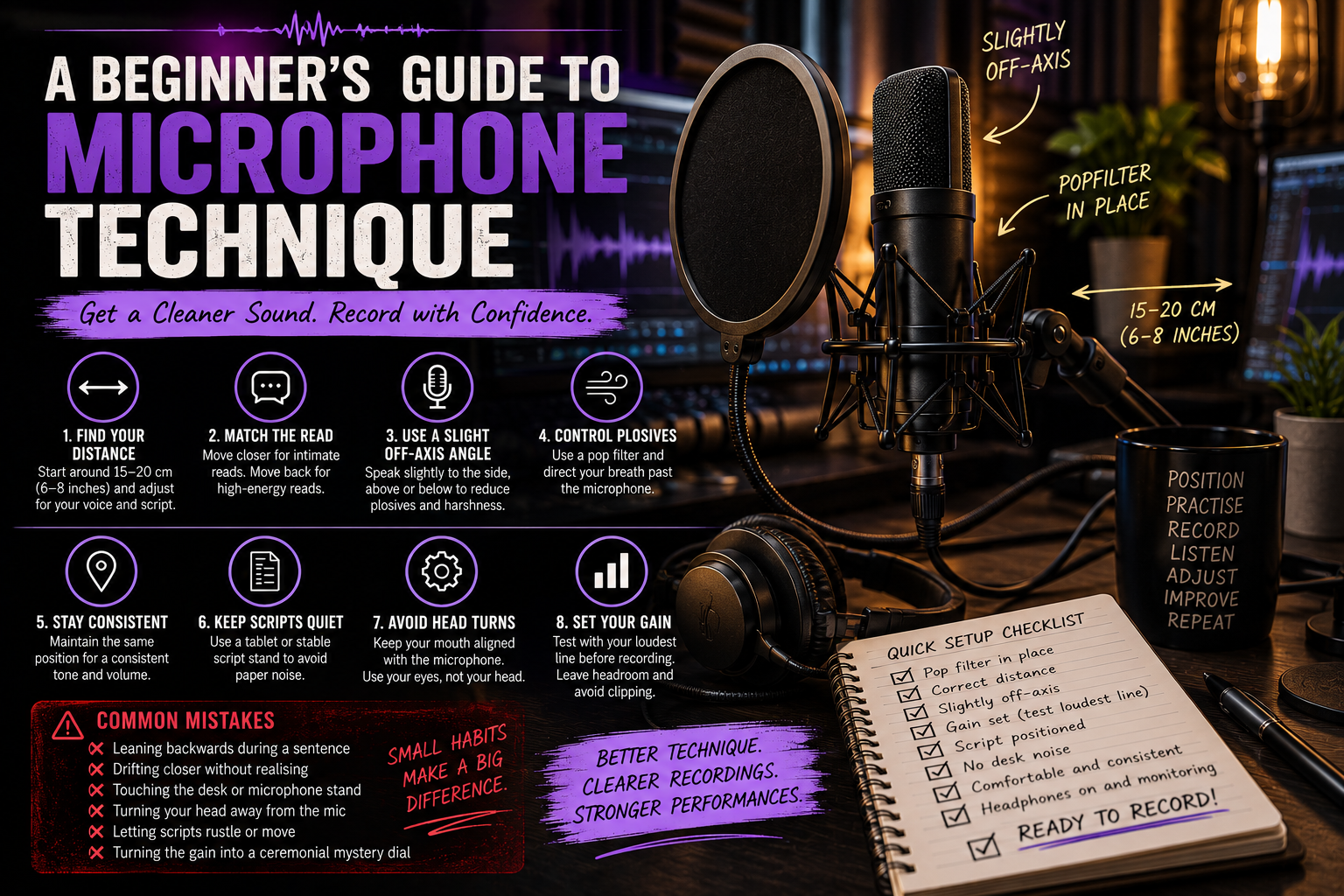
A Beginner’s Guide to Microphone Technique
A Beginner’s Guide to Microphone Technique
A good microphone can only record what reaches it.
That sounds obvious, but microphone technique is one of the most overlooked skills in beginner voice-over. Two people can use the same microphone, in the same room, with the same settings, and produce noticeably different recordings simply because they position themselves differently.
Microphone technique affects:
- Clarity
- Warmth
- Volume
- Breath noise
- Plosives
- Sibilance
- Room sound
- Consistency
- Editing difficulty
It also affects performance.
Standing too far away can make you push unnecessarily. Sitting too close can exaggerate every breath and mouth click. Constantly moving around can make a perfectly good performance sound inconsistent from sentence to sentence.
The goal is not to find one magical microphone position and remain frozen there forever.
The goal is to understand how distance, angle, movement, and gain affect your recording so you can make deliberate choices.
Start With a Standard Speaking Distance
For many voice-over recordings, a good starting point is around 15 to 20 centimetres from the microphone.
That is roughly the distance between your thumb and little finger when your hand is stretched out.
This is not a universal rule.
Different microphones respond differently, and the ideal distance depends on:
- Your voice
- The microphone type
- The recording environment
- How loud the performance is
- How much proximity effect the microphone produces
- The style of the read
However, starting around 15 to 20 centimetres gives you enough space to reduce breath noise while still capturing detail and intimacy.
Use a pop filter between you and the microphone as a visual reference point.
Once you find a position that works, try to reproduce it consistently.
Why Distance Matters
Moving closer to a microphone changes more than the volume.
Directional microphones often produce something called proximity effect, where lower frequencies become stronger as you move closer to the capsule.
This can make a voice sound:
- Warmer
- Deeper
- Fuller
- More intimate
Used deliberately, this can be useful.
Used accidentally, it can make a recording muddy, boomy, or inconsistent.
Moving farther away reduces proximity effect, but it also allows more room sound into the recording.
That means you may capture:
- More reflections
- More background noise
- More computer fan
- More traffic
- More household noise
Distance is therefore a balance between vocal detail and the environment around you.
Intimate Reads
Some scripts call for closeness.
Audiobook narration, emotional dialogue, luxury commercials, whispered promos, or reflective storytelling may benefit from a more intimate recording position.
You can move slightly closer to the microphone for these reads.
However, closer does not mean pressing your lips against the pop filter like you are sharing state secrets with it.
As you move closer:
- Lower your performance volume slightly
- Watch for excessive bass
- Listen for mouth clicks
- Control breath direction
- Check plosives carefully
- Reduce the input gain if necessary
An intimate read should feel close emotionally, not merely physically.
If moving closer makes your voice unnaturally bass-heavy or magnifies every tiny mouth noise, move back slightly.
You can create intimacy through performance as much as microphone distance.
High-Energy Reads
Commercials, video games, animation, trailers, promos, and character work often involve louder performances.
If you know a script contains shouting, combat lines, excited announcements, or sudden bursts of energy, prepare the microphone setup accordingly.
Move slightly farther away from the microphone.
This gives your voice more room and reduces the chance of clipping or overloading the microphone.
You may also need to:
- Lower the input gain
- Turn slightly farther off-axis
- Increase pop-filter distance
- Maintain better body control
- Test the loudest line before beginning
Do not set your gain using a quiet line and then discover halfway through recording that the battle cry has turned the waveform into a solid rectangular brick.
Test the loudest expected performance first.
Use Distance Dynamically
Experienced performers often make subtle distance adjustments during a session.
A quiet line may be recorded slightly closer.
A shout may be delivered slightly farther away.
These movements should be small, controlled, and repeatable.
The microphone should not become something you dramatically charge toward and retreat from like a duelling opponent.
Large movements create obvious changes in tone and room sound.
A few centimetres can be enough.
The key is knowing why you are moving.
Record Slightly Off-Axis
You do not always need to speak directly into the centre of the microphone.
In fact, recording slightly off-axis can improve many voice-over recordings.
Instead of placing the microphone directly in front of your mouth, position it slightly above, below, or to the side.
Your voice still reaches the microphone clearly, but bursts of air travel past the capsule rather than directly into it.
This can help reduce:
- Plosives
- Breath noise
- Excessive sibilance
- Harsh consonants
A common setup is to position the microphone slightly above mouth level and angle it downward toward you.
Another option is to place it slightly to one side.
Experiment with small adjustments.
Moving too far off-axis can change the microphone’s tone or reduce clarity, depending on its pickup pattern.
Reducing Plosives
Plosives are sudden bursts of air caused by sounds such as:
- P
- B
- T
- D
The P sound is usually the most troublesome.
Say the word:
“Pop.”
Place your hand a few centimetres in front of your mouth.
You can feel the burst of air.
When that burst hits the microphone capsule, it can create a low-frequency thump that is difficult to repair cleanly.
Use a Pop Filter
A pop filter sits between your mouth and the microphone and reduces the force of those air bursts.
It should not replace good microphone technique, but it helps enormously.
Position the filter several centimetres away from the microphone rather than pressing it directly against the grille.
This creates space for the air to disperse before it reaches the capsule.
Change the Microphone Angle
If plosives are still a problem, move the microphone slightly away from the direct path of your breath.
Try positioning it:
- Slightly above your mouth
- Slightly below
- A few centimetres to one side
Your voice spreads outward and will still reach the microphone.
The concentrated burst of air travels more directly forward.
Moving the capsule out of that path often solves the problem immediately.
Use Performance Technique Too
Some plosives can also be reduced through articulation.
You do not need to remove P or B sounds completely.
Simply avoid firing them at the microphone with unnecessary force.
Practise lines containing repeated plosives and listen carefully.
For example:
“Peter prepared the perfect promotional package.”
Record the line several times using different microphone angles.
You will quickly hear which position works best.
Maintain Consistent Positioning
Consistency is one of the most important microphone skills in voice-over.
If your distance changes constantly, the recording changes constantly.
You may hear differences in:
- Volume
- Bass
- Clarity
- Room tone
- Sibilance
- Breath noise
This becomes particularly obvious when editing multiple takes together.
A replacement line recorded much closer to the microphone can sound completely different from the surrounding material.
Mark Your Position
Once you find a reliable setup, document it.
You can mark:
- Chair position
- Microphone stand position
- Pop-filter location
- Microphone height
- Desk position
Removable tape can help.
You can also take a photograph of your setup.
For long-form projects such as audiobooks or e-learning, this becomes extremely useful.
Weeks later, you may need to record a single replacement sentence.
The closer you can reproduce the original setup, the easier that replacement becomes.
Use the Pop Filter as a Distance Guide
Your pop filter can serve as a physical reference.
If you know your mouth should remain around one hand-width from the filter, you have an easy visual reminder.
This helps prevent gradual drift during longer sessions.
Because drift happens.
You begin the session perfectly positioned.
Twenty minutes later, you are somehow leaning across the desk, six centimetres from the microphone, speaking directly into the side of the pop filter and wondering why everything suddenly sounds like late-night radio.
Reset regularly.
Avoid Head Turns
Turning your head away from the microphone changes the sound dramatically.
This often happens when:
- Looking at another monitor
- Reading from a script placed to the side
- Checking notes
- Reaching for controls
- Acting with large physical movements
If your mouth moves away from the microphone’s pickup area, the recording can become quieter, thinner, or more distant.
Position the Script Properly
Place your script where you can read it without turning your head significantly.
Ideally, it should sit close to the microphone or directly behind it.
If you use a monitor, position the microphone so you can see the script while maintaining your recording angle.
A tablet can be especially useful because it allows you to keep the script close without introducing paper noise.
Use Your Eyes More Than Your Head
If you need to glance at notes, try moving your eyes rather than turning your entire head.
Small movements are usually fine.
Large turns can become audible.
For character performances, physical acting can be useful, but stay aware of the microphone.
You can gesture.
You can move your face.
You can react.
You simply need to remain acoustically connected to the microphone.
Keep Scripts Quiet
Paper is surprisingly loud.
The microphone notices things you barely hear in the room.
Page turns, finger movements, paper rubbing, and script adjustments can all enter the recording.
Use a Tablet or Monitor
Digital scripts remove much of this problem.
A tablet or monitor allows silent page changes and keeps the script stable.
Use:
- Silent scrolling
- Large text
- Comfortable brightness
- Clear spacing
- Easy page navigation
Avoid using a noisy mouse or keyboard during live recording where possible.
If You Use Paper
Paper scripts are perfectly usable, but prepare them carefully.
Try:
- Placing pages flat on a stable stand
- Turning pages during natural breaks
- Separating pages before recording
- Avoiding stapled corners that catch
- Using heavier paper that rustles less
- Keeping your hands away from the microphone
You can also record one page at a time when practical.
Do not attempt a dramatic emotional monologue while simultaneously wrestling a stack of printer paper that has decided to become a flock of frightened birds.
Avoid Desk Noise
Your microphone can pick up vibrations through the desk or stand.
Common sources include:
- Resting your hands heavily on the desk
- Tapping fingers
- Clicking pens
- Moving the mouse
- Typing
- Kicking the desk
- Bumping the microphone arm
A shock mount helps reduce some vibrations, but it cannot eliminate everything.
Keep unnecessary movement away from the microphone stand.
If your boom arm is attached to the desk, remember that anything striking the desk may travel directly into the microphone.
Set the Gain Before Recording
Gain controls how strongly your microphone signal is amplified before it is recorded.
Setting it correctly is essential.
If the gain is too low, your recording may be unnecessarily quiet and require additional amplification later.
If it is too high, loud passages can clip and distort.
Clipped audio cannot be fully repaired.
Test the Loudest Part First
Before beginning a session, perform the loudest expected section.
Watch your recording level.
You want healthy signal without hitting the maximum limit.
Leave room for unexpected increases in volume.
This extra space is called headroom.
Different systems display levels differently, but the principle is simple:
Do not record so hot that every loud line is flirting with zero.
You want safety.
Do Not Chase the Meter Constantly
Once gain is set correctly, leave it alone unless the performance changes substantially.
Do not adjust the gain between every sentence.
Constant gain changes create inconsistent recordings and make editing more difficult.
Set the input according to the performance style and maintain your position.
If you change from intimate narration to screaming combat dialogue, then yes, adjust.
If sentence two is simply slightly louder than sentence one, you probably do not need to perform a small ritual at the interface.
Use Direct Monitoring
If your audio interface or microphone offers direct monitoring, use it when helpful.
Direct monitoring allows you to hear your microphone signal with little or no delay.
This can help you detect:
- Plosives
- Excessive mouth noise
- Position changes
- Background noise
- Clothing rustle
- Distortion
Keep headphone volume sensible.
You should hear enough to monitor the recording without becoming distracted by your own voice.
Do Not Let Monitoring Change Your Performance
Some people naturally become quieter when they hear themselves loudly in headphones.
Others begin over-performing because the voice sounds unusually large or polished.
Experiment with headphone level until monitoring supports rather than interferes with the performance.
Some actors prefer one ear slightly uncovered during certain reads so they retain a more natural sense of their own voice.
Adjust for Different Microphones
Not every microphone behaves the same way.
Dynamic microphones may tolerate closer positioning and often reject more room sound.
Condenser microphones may capture greater detail and more of the surrounding environment.
Some microphones produce strong proximity effect.
Others remain relatively neutral.
Some are highly sensitive to off-axis movement.
Others are more forgiving.
Learn your microphone.
Record the same paragraph at several distances and angles.
For example:
- 10 cm directly on-axis
- 15 cm on-axis
- 20 cm on-axis
- 15 cm slightly off-axis
- 20 cm slightly off-axis
Label the recordings.
Then listen carefully.
You will learn more about your microphone from ten minutes of controlled testing than from another hour of arguing with strangers online about frequency response graphs.
Common Microphone Technique Mistakes
A few habits appear repeatedly in beginner recordings.
Leaning Backwards During a Sentence
Some performers begin close to the microphone and gradually lean away as they speak.
The sentence becomes quieter and thinner toward the end.
This often happens unconsciously, particularly during long phrases.
Keep your posture stable and let breath support carry the sentence rather than physically retreating from it.
Drifting Closer
The opposite problem is equally common.
You begin at a sensible distance and slowly move toward the microphone.
Bass increases.
Mouth noise becomes louder.
Plosives become stronger.
By the final paragraph, the microphone has become your closest confidant.
Use a distance reference and reset regularly.
Touching the Desk
Tapping, writing, clicking, adjusting, drumming fingers, and leaning heavily on the desk can all travel through the microphone stand.
Keep your recording area physically quiet.
If you need to make notes, pause recording first.
Turning the Microphone Gain Into a Ceremonial Mystery Dial
Beginners sometimes treat the gain control as though the correct setting is hidden somewhere between eleven and twelve o’clock and must be rediscovered before every session.
Gain is not a magical number.
It depends on:
- Microphone sensitivity
- Interface
- Voice level
- Distance
- Performance style
Set it using an actual performance test.
Watch the meter.
Listen.
Then leave it alone.
The interface does not require an offering.
Other Common Problems
Watch for:
- Sitting too close to reflective walls
- Speaking directly across the microphone instead of into its correct side
- Forgetting which side of a side-address microphone is active
- Recording too quietly because clipping feels frightening
- Recording too loudly because large waveforms look impressive
- Moving the pop filter during takes
- Allowing headphones to scrape against clothing
- Wearing noisy jewellery
- Letting sleeves brush the desk
- Moving the microphone arm while recording
Many of these are easy to fix once you know they are happening.
Know Which Side of the Microphone Is Active
This mistake deserves special mention.
Many condenser microphones are side-address microphones.
You speak into the side of the microphone, not the top.
Usually, the correct side contains:
- The manufacturer’s logo
- A pattern selector
- A clearly marked front surface
Check the manual.
Recording into the wrong side can make an otherwise good setup sound distant, dull, or strangely thin.
It happens more often than anyone likes to admit.
Build a Pre-Recording Routine
A repeatable routine improves consistency.
Before each session:
- Check microphone position.
- Check pop-filter distance.
- Sit or stand in your normal position.
- Place the script correctly.
- Put on headphones.
- Record a short test.
- Perform the loudest expected line.
- Adjust gain if needed.
- Listen for room noise.
- Check plosives.
- Check for clothing or desk noise.
- Begin recording.
This takes only a few minutes.
It can prevent an entire session from needing to be repeated.
Listen Back Before Recording for an Hour
Always listen to your test recording.
Do not assume the setup is correct because it worked yesterday.
Something may have changed.
The microphone may have moved.
The gain may have been adjusted.
The computer fan may be louder.
A cable may be loose.
The neighbour may have resumed construction of the legendary wardrobe.
Thirty seconds of testing can save a great deal of frustration.
Practise Technique Separately From Performance
Microphone technique becomes easiest when it is automatic.
Set aside occasional practice sessions where the goal is not acting quality.
Instead, practise:
- Maintaining distance
- Turning slightly off-axis
- Moving back for louder lines
- Moving closer for intimate lines
- Keeping your head aligned
- Controlling plosives
- Handling scripts quietly
Once these behaviours become familiar, you can stop thinking about them during real performances.
Technique should support acting.
It should not occupy your entire brain while you are trying to communicate emotion.
A Simple Microphone Technique Exercise
Choose one paragraph of around 100 words.
Record it five times.
Take One
Record at your normal position.
Take Two
Move noticeably closer.
Take Three
Move farther away.
Take Four
Return to your normal distance but angle the microphone slightly off-axis.
Take Five
Use the position that sounded best and focus entirely on consistency.
Compare them.
Listen for changes in:
- Bass
- Clarity
- Room sound
- Plosives
- Breath noise
- Sibilance
- Volume
This exercise teaches you how positioning affects sound more effectively than memorising technical rules.
A Beginner’s Microphone Technique Checklist
Before pressing record, ask:
- Am I at a consistent distance?
- Is the microphone at the correct height?
- Am I slightly off-axis if needed?
- Is the pop filter positioned correctly?
- Is my loudest line safely below clipping?
- Is the script positioned without requiring head turns?
- Can I change pages quietly?
- Is the desk stable?
- Are my hands and clothing quiet?
- Have I recorded and listened to a test?
- Do I know how I will handle louder or quieter lines?
If the answer is yes, you are ready to concentrate on the part that matters most.
The performance.
Final Thoughts
Good microphone technique is not about obeying a rigid list of distances and angles.
It is about consistency and control.
Start with a sensible speaking distance.
Move closer when intimacy genuinely benefits the read.
Move back when the performance becomes louder.
Record slightly off-axis when it helps control plosives and breath.
Keep your position stable.
Place the script where you can read it without turning away.
Set your gain using the performance you are actually about to give.
Then stop thinking about the equipment.
Once your microphone technique is reliable, the technology begins to disappear.
You are no longer wondering where your mouth should be, whether the gain is correct, or why every P sounds like a small explosion.
You can concentrate on the listener.
The script.
The thought.
The performance.
And that is exactly where your attention belongs.